


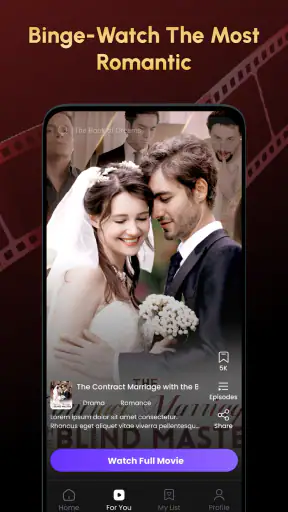
I opened Short TV: Movie Series expecting a quick entertainment app for spare moments, and that is exactly the role it seems designed to fill. It comes from Tuan Genilai and sits in the entertainment category, with a simple promise: short-form drama that can be watched without committing to a full-length movie or a long television season. My first impression was that the app is aimed at people who want an immediate story rather than a large library that takes time to organize.
That focus matters. Short TV is not the kind of app I would choose when I want a carefully curated cinema service, a familiar premium series, or a broad replacement for every streaming platform on my phone. I see it as a lightweight stop between other activities: something to open during a break, while waiting for an appointment, or after dinner when I want a small piece of fiction instead of a two-hour commitment. Its real appeal is convenience, not depth.
The app is free to install and is suitable for Everyone, which makes the basic entry point uncomplicated. It supports Android 7.0 and later, so it can work on older Android devices that may not run every newer entertainment service comfortably. At the same time, the presence of in-app purchases ranging from around one dollar to nearly two hundred dollars for an item means I would not treat “free” as the same thing as completely cost-free. I would check every purchase screen carefully before confirming anything.
From a spare minute to a short drama session
The starting condition: choosing something that fits the moment
My most realistic use case is a short break with an uncertain end time. Imagine waiting for a friend who is running late. I may have only a few minutes, or I may have longer, so opening a traditional streaming app can feel excessive. I have to browse categories, remember where I stopped, and decide whether a full episode is worth starting. Short TV is more appealing in that situation because its entire concept points toward smaller viewing sessions.
I would also use it when I am tired of scrolling through social feeds but do not have the attention for a documentary or a complicated drama. Short episodes can provide a clearer beginning and ending than endless clips. That distinction is useful: the app is not simply another feed of random videos in my routine. I open it with the intention of watching a story, even if the story is delivered in compact pieces.
There is a practical trade-off here. Short-form viewing is easier to fit into a busy day, but it can also encourage repeated “just one more” sessions. I found it better to decide in advance whether I wanted a single scene, a short sequence, or a longer sitting. Without that small boundary, the convenience that makes the app attractive can turn into unplanned screen time.
Step one: getting past the first decision
The first handoff is from my intention to the app’s available choices. I am not looking for a technical tool or a social network; I want the app to reduce the distance between opening it and finding something watchable. The short description is simply “Short TV,” so the product identity is deliberately narrow. That is helpful if I already know why I installed it, but it does not tell me much about the viewing experience before I begin.
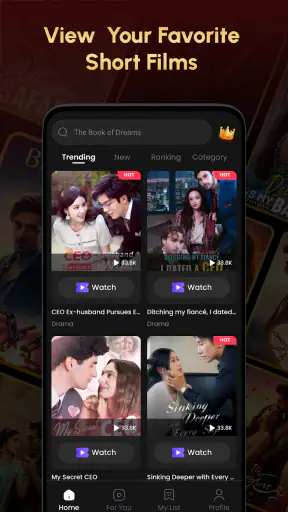
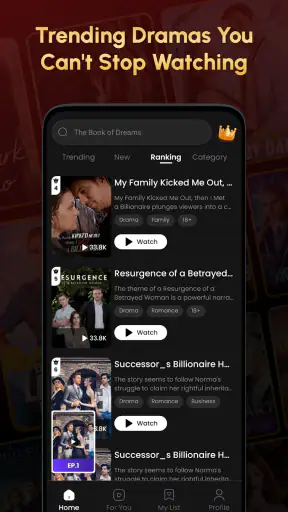
For a new user, I would approach the opening screen with a specific question: can I understand what each drama is about quickly enough to choose one? In a short-content service, browsing time can defeat the purpose. If the artwork and descriptions make the choice clear, the app works well as a break-time companion. If I have to inspect too many options before finding a suitable story, I may return to a familiar service with stronger discovery tools.
My advice is to avoid treating the catalog like a permanent library project. I would select one title that matches my mood, watch enough to decide whether the tone works for me, and then either continue or move on. This workflow keeps the app focused on immediate entertainment instead of turning it into another place where I spend more time searching than watching.
Step two: watching in short intervals
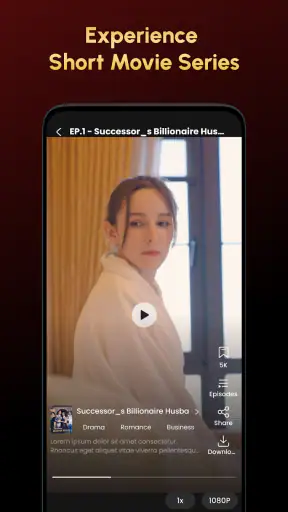
Once I choose a drama, the important question is whether the compact format suits my attention span. Short episodes can be especially useful during transitional moments: before leaving home, during a lunch break, or while waiting for a download or appointment. I like that this format lowers the psychological cost of starting. I do not need to reserve an entire evening for the story.
There is also a handoff between the app and my daily schedule. A conventional episode often asks me to protect a block of time. Short TV fits around interruptions more naturally, but that does not mean interruptions are harmless. If I stop in the middle of a dramatic moment, the experience depends on how easily I can return to the same place. I would make a habit of noting the title and episode mentally, especially if I switch between several dramas.
This is one of the less obvious ways to use the app: instead of choosing content by genre alone, I would choose it by available time. A quick break calls for something I can finish soon, while a longer wait allows me to follow a more involved sequence. Thinking this way makes the app feel more useful than simply opening it whenever I am bored.
Step three: managing the free-to-purchase transition
The free installation is a strong reason to try the service, but the in-app purchase range changes how I approach it. I would not hand my phone to a child and assume that the Everyone age rating removes every purchasing concern. The content rating describes suitability, while purchases are a separate practical issue. Before watching regularly, I would review the device’s purchase protections and keep confirmation requirements enabled.
The cost structure also affects how I judge value. A paid item can be reasonable if it unlocks a story I genuinely want to finish, but a high-priced option deserves much more caution. I would never buy simply because a story ends at a cliffhanger. That is the exact moment when impatience can replace a sensible decision. I prefer to continue using the free portions long enough to understand whether the writing, pacing, and presentation are worth spending money on.
This creates a useful personal rule: enjoy the free path first, then evaluate a purchase as a complete entertainment decision. I would consider how often I expect to use the app, whether I am likely to finish the series, and whether another service offers the same kind of viewing at a clearer overall cost. That approach protects the convenience of the app without letting the short format pressure me into impulsive spending.
The handoffs between phone, story, and attention
Short TV is most effective when the phone is already the center of the moment. I can move from a notification-heavy day into a focused story without setting up a television or searching for a remote. That makes it more personal than a conventional living-room service, but the same advantage is also a weakness. A phone screen is easy to interrupt, and the viewing experience competes with messages, calls, and other apps.
I would therefore use it differently depending on the setting. In a quiet room, I could give the story my full attention and judge its pacing fairly. On public transport or in a noisy waiting area, I would treat it as casual viewing rather than expecting complete immersion. This distinction matters because short drama can feel engaging when watched continuously but fragmented when repeatedly interrupted.
Another practical handoff is from watching alone to recommending something to another person. The app is a better fit for a friend who enjoys quick dramatic scenes than for someone who wants shared viewing on a large screen. If my household usually watches together, I would choose a service built around television viewing and synchronized discussion. Short TV feels more naturally individual and immediate.
What the result feels like after regular use
After using the app as a small entertainment stop, I see its strongest result as reduced commitment. It gives me a reason to watch fiction when I have only a narrow window, and that can be surprisingly valuable. I do not always want a blockbuster, a long season, or a complicated recommendation system. Sometimes I want a compact story that begins quickly and lets me return to my day.
The app’s scale also suggests that it has found a substantial audience: it has passed one million installs and holds an average rating of 3.4 from around 753 ratings. I read that combination as interest with noticeable room for improvement, rather than as a guarantee of a polished experience. The rating is neither a reason to dismiss the app nor a reason to install it blindly. I would use the free entry point to form my own opinion.
Its current version is 2.3, and that gives the app a more established feel than a brand-new experiment. Still, version numbers alone do not tell me whether every part of the viewing flow will suit my device or habits. The most important test remains simple: can I find a drama quickly, watch comfortably, return without confusion, and avoid unwanted spending?
Where the flow breaks
The first possible break is discovery. The app’s identity is clear, but a narrow identity does not automatically mean effortless navigation. If I am in the mood for a particular kind of drama and cannot identify it quickly, the short format loses some of its advantage. This is where a larger streaming service may be better, especially if I want stronger filters, established franchises, or a broad mixture of films and series.
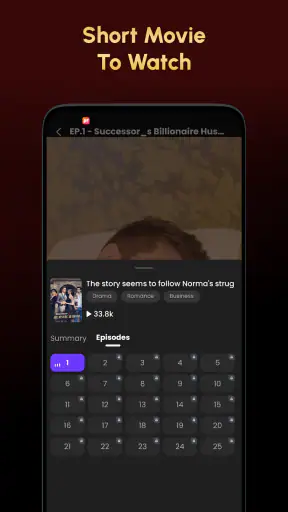
The second break is continuity. Short viewing works best when the app makes it easy for me to resume a story, but life rarely provides uninterrupted sessions. I may close the app, answer a call, or switch to another task. If returning to the correct episode or moment requires too much searching, I lose the emotional thread. My workaround is to stay with one drama at a time rather than starting several in parallel.
The third break is purchasing pressure. A free app with optional items can be perfectly reasonable, but the wide purchase range means I would examine the wording and confirmation screen before tapping. Users who dislike any form of paid progression or who want one predictable subscription may feel more comfortable with a conventional streaming alternative. Short TV is not the right choice for someone who wants pricing to disappear completely into the background.
The fourth break is expectations. The store summary describes short drama, not a complete replacement for mainstream television. I would not install it expecting every major film, prestige series, or familiar channel. Its value depends on accepting the format. If I want a deep catalog with long episodes and high-production flagship shows, I would look elsewhere. If I want quick, phone-friendly stories, its limited focus becomes an advantage rather than a defect.
Who should try it, and who should skip it
I would recommend Short TV to casual viewers who regularly have small pockets of free time and enjoy dramatic storytelling in compact portions. It is also worth trying for people with older Android phones, since the minimum requirement is Android 7.0 or later. The free installation makes experimentation easy, provided the user remains attentive to purchase prompts.
I would be more cautious recommending it to families who expect a completely controlled children’s viewing environment, even though the age rating is Everyone. I would also steer away users who want a single service for movies, major television series, and group watching. They are likely to get more from a broader streaming platform with a clearer living-room workflow.
For me, the best routine is straightforward: open the app when I have a defined break, choose one short drama, watch without multitasking when possible, and leave purchases until I have decided that the story is worth finishing. That routine turns the service into a useful entertainment tool instead of another source of endless browsing.
My recommendation after following the full workflow
Short TV: Movie Series succeeds when I judge it by the job it is trying to do: deliver short drama for quick viewing on an Android phone. Tuan Genilai has positioned it as a focused entertainment app rather than a universal streaming destination, and that focus makes sense for busy viewers. The free starting point, Everyone rating, support for Android 7.0 and newer, and large install base make it easy to consider.
My recommendation is positive but measured. I would install it for short, personal viewing sessions, not as my only entertainment subscription. I would keep purchase controls in place, avoid choosing stories solely because of cliffhangers, and compare the experience with a broader streaming service if my needs grow. If that workflow matches your day, this app can fill an awkward gap between social clips and full-length television. If you want a deep catalog, predictable pricing, or shared-screen viewing, another option will probably serve you better.


